If you're speccing the network for a new café, restaurant, bar or small guest house in 2026, you're going to hit a question you didn't have to think about even three years ago: do we go 1 Gigabit switching, or step up to 2.5 Gigabit? And do you actually need WiFi 7 access points on top, or is that just spec-sheet bling?
This is an installer's honest answer, written after speccing and building one of these networks for a real Leeds city-centre restaurant earlier this year — a repeat customer we originally did an emergency job for in Harrogate who then trusted us with the whole fit-out for their new LS1 site (venue unnamed at their request, but the topology below is the actual live install).
The short version, up front: spend the multi-gig budget on the AP-backhaul tier, keep the tills and printers on 1 Gigabit, and don't confuse "WAN speed" with "LAN capacity" — they are not the same thing.
What 1 Gbps vs 2.5 Gbps actually means (at the port, not the WAN)
Let's clear up the single most common misunderstanding first, because half the pushback we get on this spec is people confusing two entirely different things.
- Your WAN speed is what your broadband provider gives you: 500 Mbps, 900 Mbps, 1 Gbps FTTP, whatever your fibre package is. This is download to the internet.
- Your LAN port speed is what devices inside the building negotiate with the switch: 1 GbE or 2.5 GbE per port. This is device to device to access point, all local, and has nothing directly to do with the WAN.
You can absolutely have a 900 Mbps FTTP line coming in, terminated on a router with a 2.5 GbE LAN port, feeding a 2.5 GbE switch, feeding 2.5 GbE-uplinked access points — and the LAN moves data at 2.5 Gbps between those bits regardless of what your WAN speed is. Which matters, because…
Why WiFi 7 can genuinely saturate a 1 Gbps uplink
Here's the number that changed the game. A modern WiFi 7 access point — like the TP-Link EAP773 we deployed on the Leeds job — is a tri-band unit that can address the 2.4 GHz, 5 GHz and 6 GHz bands simultaneously, uses 320 MHz-wide channels on 6 GHz, and supports Multi-Link Operation so a single client can use two bands at the same time.
The real-world consequence: a single WiFi 7 AP in a busy hospitality room, with a handful of modern phones and laptops on MLO plus the usual background streaming, will comfortably push 1.3–1.7 Gbps of aggregate wireless traffic at the AP. That number is higher than a 1 Gigabit Ethernet uplink can carry.
If you cable that AP with a 1 GbE run, you have — by definition — capped your very expensive WiFi 7 kit at 1 Gbps regardless of what the box says. This is the same argument our Mesh WiFi vs WiFi extender post makes for homes ("the backhaul matters more than the radio standard"), except in a commercial fit-out it's worse: you have 40, 60, 100+ concurrent devices leaning on that bottleneck at once, not five.
The high-density Friday-night reality
Domestic and commercial WiFi are not the same problem. In a home you might have twelve devices connected across an evening; only two or three are actually pushing bytes at any given second.
In a busy Leeds city-centre restaurant on a Friday night we regularly measure:
- 40–80 guest devices per AP connected to the guest network at any given hour
- Card readers (typically 4–8) polling the acquirer every few seconds
- EPOS tills (2–4) syncing to the head office and firing off print jobs
- Staff devices — order pads, kitchen display tablets, back-office laptop
- Background CCTV or door-entry traffic if the CCTV and camera system shares the network stack
Aggregate that in one busy hour and you have easily 60+ concurrent WiFi clients per AP, each fighting for airtime, plus a wired-side sync tail that the switch has to move without dropping frames. This is genuinely the case where the difference between 1 GbE and 2.5 GbE at the AP uplink becomes user-visible: guests get faster page loads and their card payments go through instantly, or they get "please wait" and eventually leave a bad review.
The real Leeds install — where 2.5 Gbps went, and where it didn't
Here's the topology we built for the LS1 restaurant. This is the exact live spec, not a marketing example.
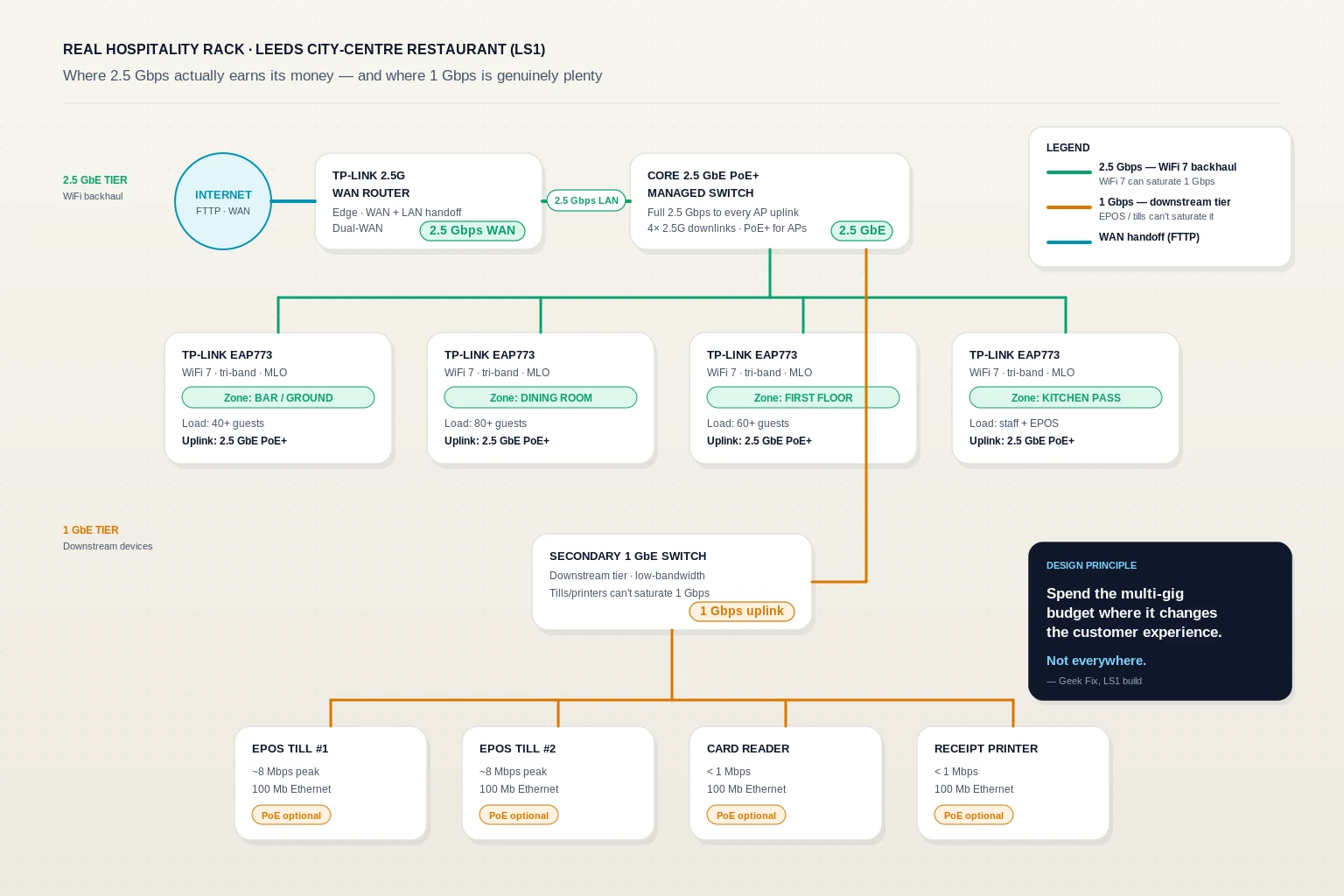
2.5 Gigabit tier — the WiFi backhaul side:
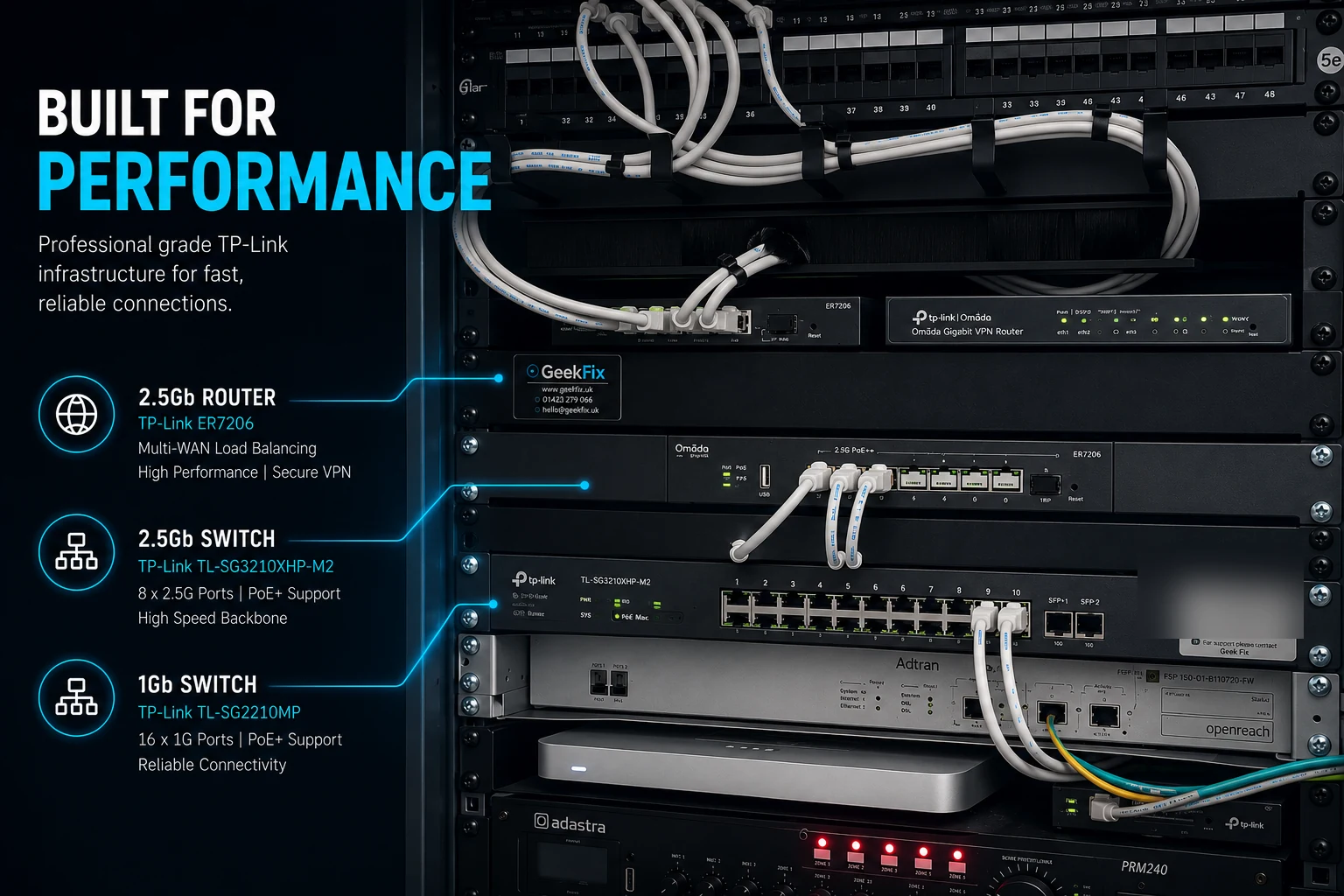
- TP-Link 2.5G WAN router at the edge — handles WAN termination plus the LAN handoff.
- Core 2.5 GbE PoE+ managed switch — feeds all four access points on full 2.5 Gbps uplinks and powers them over PoE+.
- Four TP-Link EAP773 WiFi 7 access points — one covering the bar/ground floor, one dining room, one first floor, one over the kitchen pass. Each cabled with a Cat6a run to the core switch on a 2.5 GbE PoE+ uplink.
1 Gigabit tier — the downstream low-bandwidth side:
- Secondary 1 GbE PoE switch hanging off the core switch on a 1 Gbps uplink.
- Two EPOS tills, one card reader (+ backup), one receipt printer, one kitchen display, and a door-entry keypad — all on 100 Mb or 1 GbE ports. Combined peak throughput of the entire downstream tier is well under 50 Mbps in normal operation.
The design principle is straightforward: the tills and printers cannot saturate a 1 Gbps uplink no matter how hard they try. Card readers push under 1 Mbps; receipt printers push kilobytes. Spending 2.5 Gbps of switch budget on that tier would be pure waste. Meanwhile, the WiFi backhaul tier is exactly where those spare gigabits actually turn into a better customer experience.
When 1 Gbps is genuinely still fine
Not every venue needs the split-tier design above. A quick honest rule of thumb:
- Small independent café, <15 concurrent devices, single WiFi 6 (not 7) access point → 1 GbE end-to-end is fine. Save the money.
- Small office with fewer than 20 staff, no WiFi 7 kit specced → 1 GbE is fine; the LAN never breathes hard.
- Traditional pub with wired card readers and free guest WiFi but no heavy streaming → 1 GbE is fine; total load rarely exceeds 200 Mbps.
- Any venue with WiFi 7 access points and 40+ concurrent guests → 2.5 GbE on the AP uplinks. If you skimp here you'll bottleneck the WiFi you just paid for.
The pattern to spot is AP saturation potential, not "am I a restaurant". A small architect's studio with two WiFi 7 APs and heavy 4K collaboration traffic wants 2.5 GbE backhaul. A 40-cover pub with the WiFi mostly used for guest browsing does not.
What it actually costs to go 2.5 GbE on the backhaul tier
Market illustration only — actual quotes always depend on the specific site, cabling and hardware mix.
| Hardware line | 1 GbE spec | 2.5 GbE spec | Delta |
|---|---|---|---|
| 8-port PoE+ managed switch (TP-Link Omada tier) | ~£180–£220 | ~£290–£380 | +£100–£160 |
| Core router with multi-gig LAN | Included in 1G router | +£40–£90 for 2.5G model | +£40–£90 |
| Cat6a cabling (already required for PoE+ runs) | Same | Same | £0 |
| Total hardware delta on a small hospitality build | ~£140–£250 |
Set that against the cost of the WiFi 7 access points themselves — typically £150–£220 each at trade in mid-2026 — plus the labour for a full commercial cabling job, and the 2.5 GbE upgrade is a rounding error. Buying WiFi 7 kit and cabling it on 1 GbE uplinks would be like paying for a car that does 180 mph and then only ever driving it in third gear.
Applying the wired-backhaul argument to commercial
The core argument from our Mesh WiFi vs WiFi extender post — "the standard on the box matters far less than the back-channel between the nodes" — applies identically to commercial installs, just with different consequences.
- In a home: bad backhaul = frustrated family and a phone call to us.
- In a hospitality venue: bad backhaul = missed card payments, "the WiFi is broken again" written into a Tripadvisor review, and staff losing trust in the till system on a busy night.
Which is why for any business network setup we spec in Leeds or across Yorkshire, we always specify the AP-backhaul tier separately from the downstream tier. Two different jobs, two different price points, two different bits of kit. And on any new commercial build in 2026, the AP-backhaul tier is now 2.5 GbE by default — because WiFi 7 is here, WiFi 7 APs are already normal spec, and specifying 1 GbE on the backhaul today is knowingly bottlenecking a system you're about to hand over to a customer who will complain in six months when their venue gets busier than they planned for.
From the field — Alex
The LS1 restaurant job was interesting because the owner had already been quoted by someone else who'd specced the whole build on a flat 1 GbE fabric — including the WiFi 7 backhaul. When we ran the numbers, four EAP773s on 1 GbE uplinks would have hit their aggregate ceiling somewhere around 4 Gbps of theoretical WiFi throughput but capped at 4 Gbps of wired capacity — sounds fine, except each AP individually gets bottlenecked to 1 Gbps under load, and MLO's benefit vanishes. Split-tier design was £180-ish more in hardware. Six months in, no complaints, card payments never stall, and the guest WiFi does exactly what it's supposed to do on a Friday night. That's the whole story.
The 60-second decision matrix
If you're speccing a hospitality build in 2026, here's the short version:
- Choosing WiFi 7 access points? → 2.5 GbE (or better) on the AP-backhaul tier. Non-negotiable.
- Sticking with WiFi 6 or 6E? → 1 GbE backhaul is fine, no upgrade needed. WiFi 6 can't saturate a 1 GbE uplink under normal hospitality load.
- Tills, card readers, printers, kitchen displays? → 1 GbE always. They cannot saturate it; multi-gig spend here is pure waste.
- CCTV / IP cameras? → 1 GbE for small (4–8 camera) systems; 2.5 GbE only if you're specifying 4K PoE cameras with continuous cloud upload on top.
- Small back office / staff room? → 1 GbE. Zero benefit to going higher.
When to talk to us
If you're planning a new Leeds hospitality fit-out or refurbishment in Yorkshire more broadly and you'd like an honest opinion on whether 2.5 GbE is worth it on your specific build — including telling you it isn't, when that's the answer — get in touch. We'll come and look at the site, spec the two tiers appropriately, and come back with a written quote for the whole install: cabling, switching, WiFi 7 APs where they earn their money, and a downstream 1 GbE tier for everything that doesn't need more.
Every site's different. Every build gets a proper spec conversation. Some venues genuinely need 2.5 GbE backhaul; others don't — and paying us to tell you you don't need it is a legitimate outcome of a survey.
Quick recap
- 1 GbE vs 2.5 GbE is a per-tier decision, not a whole-building decision. Spend the multi-gig budget on the AP-backhaul tier; keep the downstream tier on 1 GbE.
- WiFi 7 access points can saturate a 1 Gbps uplink. If you're specifying WiFi 7 in a hospitality venue, cabling it on 1 GbE is knowingly bottlenecking your kit.
- The WAN speed and the LAN port speed are not the same thing. The LAN governs how well the building talks to itself; on a busy Friday night that's the number that matters.
- Tills, card readers and receipt printers cannot saturate 1 GbE and never will. Multi-gig spend on that tier is pure waste.
- On a full commercial fit-out, the 2.5 GbE upgrade on the AP-backhaul tier is typically £140–£250 of hardware delta. Compared with the WiFi 7 kit itself, it's a rounding error.
- The wired-backhaul argument for homes applies harder in hospitality: in a home, bad backhaul frustrates a family; in a venue, it costs card payments and reviews.