Walk into any Currys and you'll see a "Boost your WiFi!" end-cap somewhere near the doorway — a stack of £59 plug-in extenders, a shelf of £249 mesh kits, and a sales assistant who is contractually required to tell you either one will fix your dead zone upstairs. Sometimes one of them does. Often, neither does.
If you're staring down the choice between a WiFi extender and a mesh WiFi system in a UK home, this is the honest walkthrough — written by an installer who spends most weeks fixing WiFi in real Yorkshire and Lake District houses. What each device is actually doing under the bonnet, the maths on why extenders disappoint, the narrow case where they're fine, what a proper 2026 mesh install costs, and — the part almost everyone gets wrong — why the back-channel between the nodes matters more than the standard on the box.
What each thing actually is
Bit of ground-clearing before the shootout — because the marketing terminology is deliberately fuzzy.
A WiFi extender (aka "range extender", "booster", "repeater")
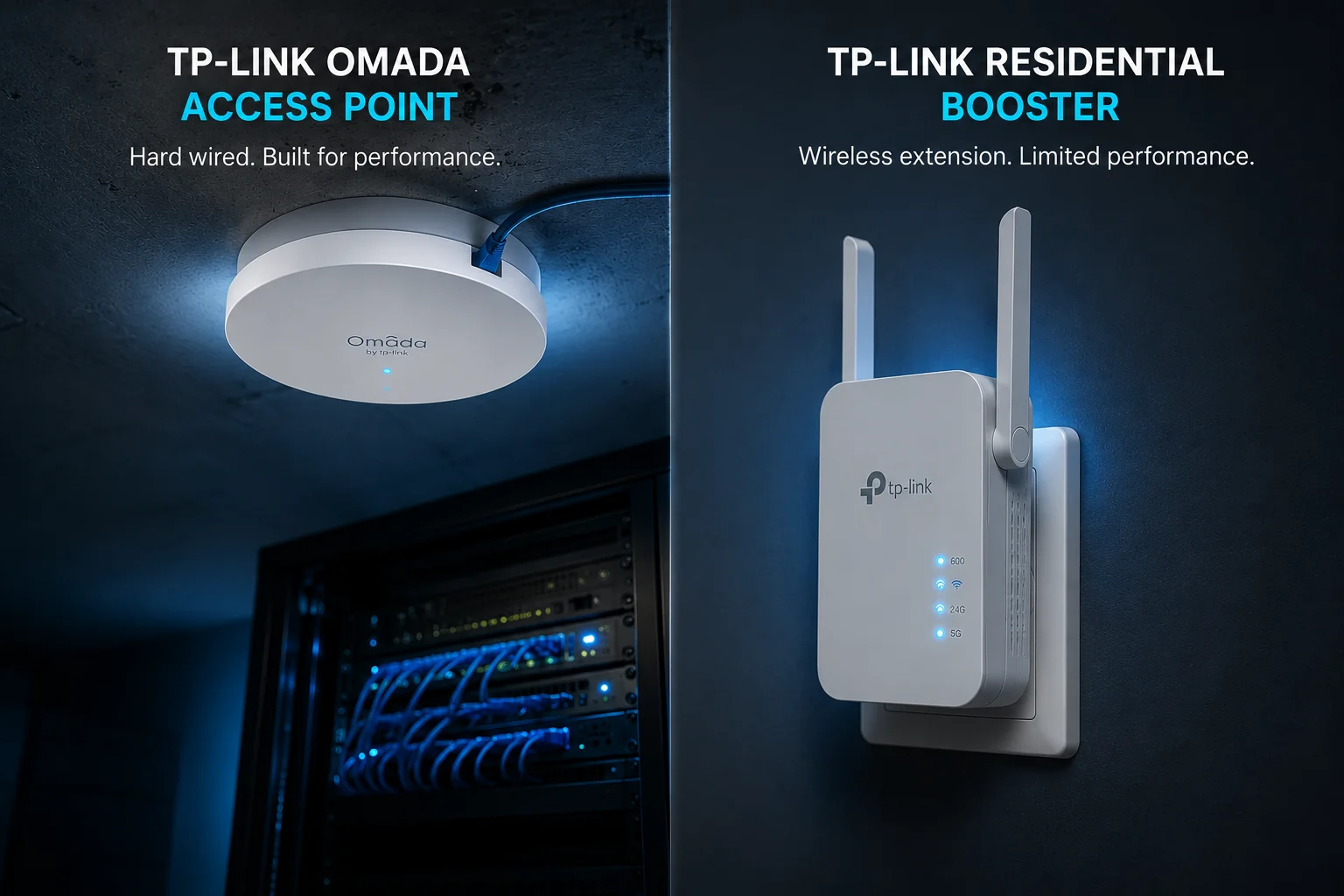
A single plug-in box, usually £30–£120 at a UK retailer. It listens for your existing router's WiFi signal, and rebroadcasts it under either the same network name or a _EXT suffix version of it.
Some extenders have one radio. Some have two ("dual-band"). Most sold in supermarkets have one, whatever the box implies.
A wireless mesh WiFi system
A kit of 2–4 identical nodes — one plugs into your broadband router by cable, the rest sit around the house. All the nodes broadcast one seamless network name, and clients (phones, laptops, TVs) roam between them automatically. Between themselves, the nodes talk on a dedicated wireless back-channel (or, ideally, a Cat6 cable).
Popular UK examples: TP-Link Deco X50/X75, Netgear Orbi, eero Pro 6E, Amazon eero, Google Nest WiFi Pro.
A proper wired-backhaul access point system
Not usually what shops mean by "mesh", but it's what real installers deploy in period properties and larger houses: one purpose-built ceiling-mounted access point per floor or per zone, each fed by a Cat6 cable back to a small PoE switch by the router. This is the setup most offices and hotels use. It's still technically "mesh" in the sense that the APs share one seamless SSID with roaming — but the back-channel is Ethernet, not radio.
TP-Link Omada EAPs and Ubiquiti UniFi U6/U7 access points are the usual choices in this class.
The maths on why extenders disappoint
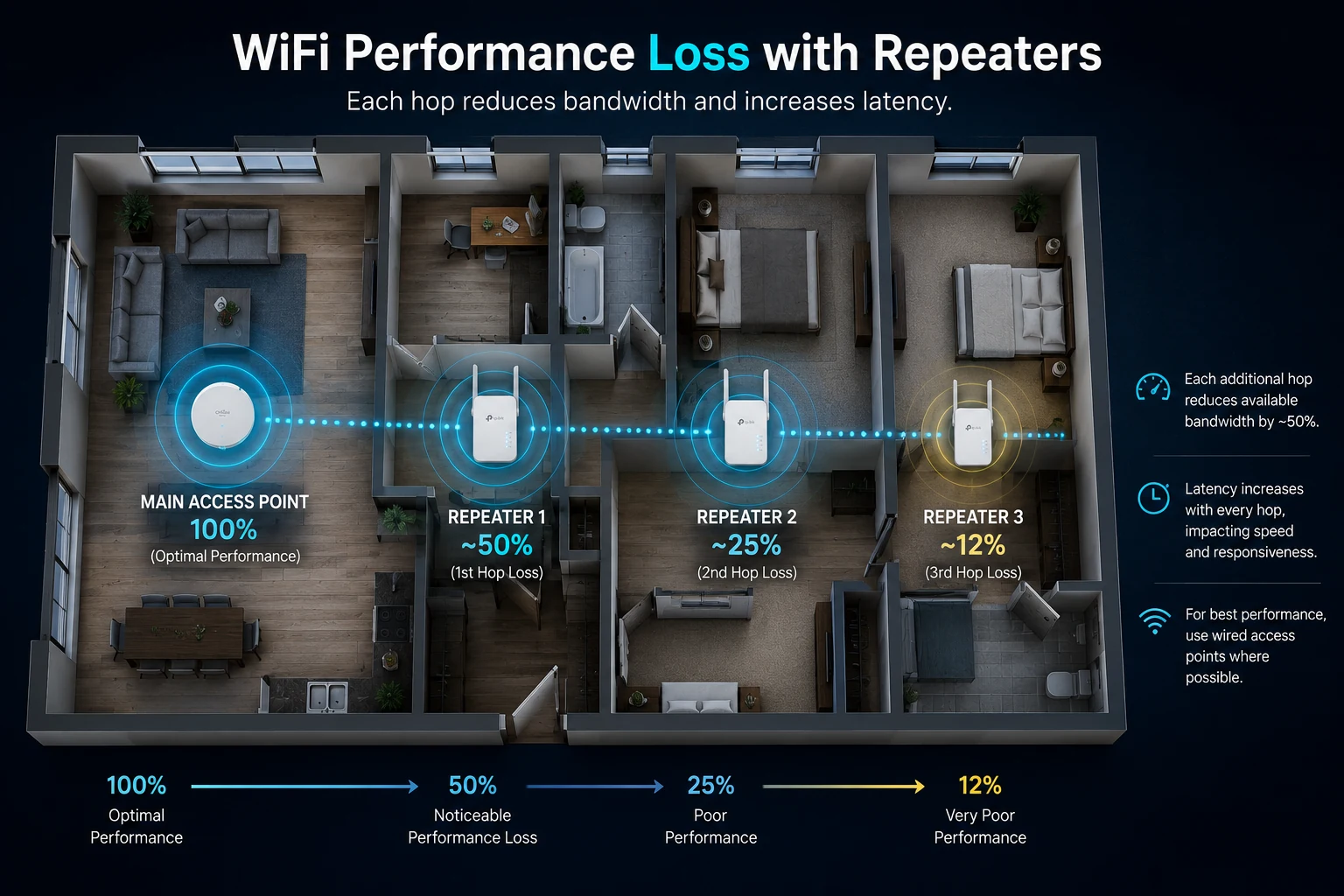
The dirty secret with single-radio extenders — and the reason installers roll their eyes at them — is a thing called airtime halving.
An extender has to do two jobs on the same radio:
- Receive the signal from your router
- Rebroadcast it to your device
If the radio can only ever do one thing at a time (which is how single-band extenders work), then it takes turns:
| Devices talking | What the extender is doing | Effective throughput per device |
|---|---|---|
| 1 device | Half receiving, half transmitting | ~50% of the received signal |
| 2 devices | Same, split further | ~25% |
| 3 devices | Same, split further | ~17% |
| 4+ devices | Approaches queuing | ~12% or worse |
Real-world figures: a 100 Mbps signal at the extender becomes about 50 Mbps to a single device. Two devices = 25 Mbps each. A family of four all streaming Sunday-evening Netflix = a slideshow.
Dual-band extenders — where receiving and rebroadcasting happen on different radios — are meaningfully better. But they still cost you a large chunk of throughput, and both radios still have to punch through the wall between the extender and the router.
There's a bigger problem: an extender can only broadcast what it receives. If the WiFi at the socket where you plug it in is already weak, the extender is rebroadcasting a weak signal. Louder doesn't mean cleaner. Anyone whose neighbour has a hi-fi turned up too loud with the treble broken knows exactly what this sounds like.
When an extender genuinely is the right answer
Before we bury extenders, credit where it's due — there is a narrow set of real cases where they're perfectly fine, and a professional wouldn't sell you a mesh system to solve them:
- A single small flat where the router is at one end and there's one weak corner at the other, and you only ever have two or three devices on WiFi at once
- A shed, garage or garden office where you want to extend coverage 5–10 metres outdoors, and you're only running one or two low-bandwidth devices out there (smart camera, a laptop for casual work)
- A holiday caravan or a boat, where you want to grab a nearby marina or campsite WiFi and share it with a few devices inside a small vehicle
Buy a decent dual-band or tri-band extender in these cases (TP-Link RE705X or similar), plug it in halfway between the router and the dead zone, and it'll do the job. Under about £100 all-in.
Outside those cases, an extender is a plaster over a problem. Which brings us to mesh.
What a mesh system actually does differently
A proper mesh WiFi system fixes the extender's core problem in one of two ways:
- A dedicated back-channel radio. Tri-band mesh systems (eero Pro 6E, TP-Link Deco X75, Orbi RBK series) put one entire radio band aside just for the nodes to talk to each other. Your devices get a full-speed link to the closest node; the nodes get a full-speed link to the router node. No airtime halving.
- Wired backhaul. If you can drop a Cat6 cable between the router and each node, the mesh nodes talk to each other over the cable — a proper 1 Gbps or 2.5 Gbps link — and your WiFi radios are entirely free to serve your devices. This is the setup that outperforms everything else in a UK home.
The other thing mesh does properly is roaming. When you walk from the kitchen to the upstairs bedroom, your phone reassociates with the nearest node without dropping the current call, Zoom or Netflix stream. Extenders make you either manually switch networks (the _EXT SSID case) or leave you clinging to the router at 3 Mbps because your phone hasn't given up on it yet. Mesh solves that.
The bit almost everyone gets wrong: the backhaul
Here's the single most important sentence in this article. In a UK home with any solid walls, the standard of WiFi on the box matters far less than how the mesh nodes talk to each other.
A WiFi 7 mesh with all its nodes talking to each other wirelessly through a solid stone wall will get demolished by an older WiFi 6 system with a single Cat6 cable between the nodes.
Real-world example from a survey we ran on a Harrogate town-house last month:
- Wireless-only mesh (owner's Deco X50, 2 nodes): 380 Mbps down at the router. 44 Mbps in the loft office. Sunday-night Zoom drops.
- Same nodes with a Cat6 cable added between them: 330 Mbps in the loft office. Zoom rock-solid.
Same kit. Different back-channel. That's the whole game.
The wired-backhaul point is a big enough deal that our own service page on the topic — mesh WiFi 6/6E/7 installation — is basically an argument for it. And in an older UK property, it's non-optional. If you've read our post on WiFi in old stone Yorkshire houses you already know why: at 5 GHz, a solid stone wall knocks your signal down by 25–40 dB. That's not a signal your mesh nodes can talk to each other through.
From the field — Alex
One of the most common jobs I get is the follow-up call two months after someone's fitted their own mesh. "It's better than before, but the office is still slow." I ask where the primary node is (living room), where the second node is (top of the stairs), and how thick the wall between them is (usually a foot or more of stone or brick with a lath-and-plaster face). The kit is fine — the problem is that the nodes can barely hear each other. Ninety percent of the time the fix is a single Cat6 cable, run externally in colour-matched conduit or through an existing service void, from the router to the far node. Overnight the loft goes from 40 Mbps to 300+. The customer already owned the mesh; they just needed the string between the tin cans.
What each option actually costs in 2026
Ballpark UK figures at the time of writing (July 2026), realistically installed, not the RRP:
| Option | Kit cost | Install | Realistic total (3-bed UK home) |
|---|---|---|---|
| Single dual-band plug-in extender | £40–£120 | DIY | £40–£120 |
| Off-the-shelf 3-node WiFi 6 mesh (Deco X50, eero 6+) | £180–£280 | DIY | £180–£280 |
| Off-the-shelf 3-node WiFi 6E mesh (Deco X75, eero Pro 6E) | £300–£450 | DIY | £300–£450 |
| Off-the-shelf 3-node WiFi 7 mesh (Deco BE85, Orbi BE) | £600–£1,100 | DIY | £600–£1,100 |
| Professional WiFi 6/6E mesh, wired backhaul, 2–3 APs | £250–£500 (Omada/UniFi APs + PoE switch) | £550–£900 + VAT | £800–£1,400 + VAT |
| Professional WiFi 7 wired-backhaul install, 3 APs, VLANs configured | £600–£1,000 | £800–£1,200 + VAT | £1,500–£2,200 + VAT |
Honest read on those numbers:
- In a modern UK build (plasterboard walls, open-plan downstairs) an off-the-shelf tri-band mesh will usually do the job for you.
- In a period property, an older brick semi, or any house with solid walls between the router and the far end, a professional wired install is what actually delivers what the box promised — and it's usually only £300–500 more all-in than the DIY tri-band mesh you'd have bought otherwise.
- WiFi 7 is worth it if you're already having the cabling done. If you're not, the extra £300–600 gets you very little in a home setting today.
The 60-second decision matrix
If you don't want to read the whole article, here's the summary:
- One-bed flat, one dead corner, two or three devices → dual-band extender, ~£70, done.
- Modern 2–4 bed house with plasterboard walls, no solid stone or brick between rooms, up to 15 devices → off-the-shelf tri-band WiFi 6/6E mesh kit, ~£250–450, wireless backhaul is fine.
- Any UK house with a stone/brick core, any period property, or a family with 20+ devices → wired-backhaul access-point system with one AP per floor, professionally surveyed and installed.
- Home office in a garden studio, converted garage, or annexe → almost always wants a proper wired AP; don't try to solve this with a mesh node bridged wirelessly through an external wall.
- A holiday let, small guest house or Airbnb → wired backhaul plus a separate isolated guest VLAN. Guests reviewing you on WiFi is a bigger deal than they realise.
Where wired backhaul isn't practical — and what to do instead
Sometimes cabling genuinely isn't feasible without expense or disruption you don't want. When we hit that in a survey we look at, in order of preference:
- External Cat6a in UV-stable conduit, routed under eaves, colour-matched to the render/stone. Usually possible on any building we visit.
- Existing service voids — old phone runs, redundant gas or oil chases, the space above a suspended ceiling.
- A short internal run via a single tidy discreet hole — 8 mm through a lath-and-plaster wall is often invisible once the socket's on.
- MoCA over existing coax, in the rare cases the house has usable satellite/aerial cabling to the far end.
- A wireless mesh with the strongest tri-band radio kit we can pick, positioned to minimise the distance the back-channel has to punch through solid material. This is our last resort.
Powerline adapters (BT Complete WiFi, TP-Link AV1000 etc.) sometimes come up in this list. Honest answer: in our experience they're a coin toss. In a house with a modern consumer unit and a single ring main they can work fine. In older UK houses with multiple ring circuits, sub-circuits, an EV charger and a heat pump, they often flap unpredictably. We fit them occasionally but we won't quote them as the primary solution.
When we'd tell you to keep your existing extender
If your extender is genuinely working — you get full bars in the room you needed to cover, streaming doesn't buffer, the family isn't complaining — don't replace it for the sake of the standard on the box. Extenders aren't evil; they're just misapplied 90% of the time.
The moment to upgrade to mesh is when:
- You've added a home office, a games console or streaming setup, or more than three connected people to the household
- You've moved into a larger property, or an older property, than the extender was originally solving for
- You keep having to reboot the extender or the router more than once a month
- You've noticed Zoom, Teams or FaceTime dropping specifically when you move rooms
Those are the signs the extender has outgrown its job.
Coverage and surveys
We cover Yorkshire, the Lake District and beyond from our base in Knaresborough — most weeks in Harrogate, York and Windermere, with regular jobs across the Dales, Wetherby, Ripon, Leeds and out into the Lakes and the North York Moors. Every install starts with a proper survey — we walk the property with a WiFi analyser, measure real signal levels in real rooms, and quote a solution that fits the building rather than the shelf at Currys. Most surveys can be booked within a week, and a typical mesh install is one day on site.
If your current WiFi has moved past the "buy another box" stage, our mesh WiFi 6/6E/7 installation service is the fastest way to book us in. If you're not sure what you need, our home WiFi service page walks through the wider decision — and if something's actively broken today, the network troubleshooting page will get you a call-back inside working hours.
Quick recap
- Extenders halve your speed on every hop when they're single-band, and even dual-band units cost you significant throughput. Fine for one weak corner in a small flat; not fine for a family home.
- Mesh WiFi solves roaming and airtime by using dedicated back-channels between nodes — either a separate radio (tri-band mesh) or, better, a Cat6 cable.
- The backhaul matters more than the WiFi standard. A WiFi 7 mesh talking wirelessly through a stone wall is beaten by a WiFi 6 mesh with a single cable between nodes.
- In a modern UK build, an off-the-shelf tri-band mesh is usually plenty. In an older property, or a period home, a professional wired-backhaul install is what actually delivers.
- Realistic 2026 costs: £70 for an extender, £250–450 for a DIY off-the-shelf mesh, £800–1,600 + VAT for a professional wired install in a 3-bed family home.
- The right answer depends on the building, not the marketing. A good installer will tell you the extender is fine when it is, and tell you to skip the mesh kit when a pair of wired access points is a better use of the same money.
If you'd like us to survey your house and tell you honestly whether an extender, a DIY mesh kit or a wired install is right for you — including telling you not to bother if what you have is fine — book a free survey. We promise a one-hour call-back during working hours and an answer that fits the property rather than the aisle at the supermarket.